Building a Persistent Browser Terminal for Sanbox Computers
A terminal in the browser sounds straightforward until you close the tab.
We wanted every Computer to have a terminal with sane defaults out of the box. You should be able to open it in a browser, run a coding agent like OpenCode or Claude Code, use it to debug a running agent, close the tab, and come back later to resume.
The basics of accessibility like selection, copy and paste, fullscreen, and scrollback should work well too.
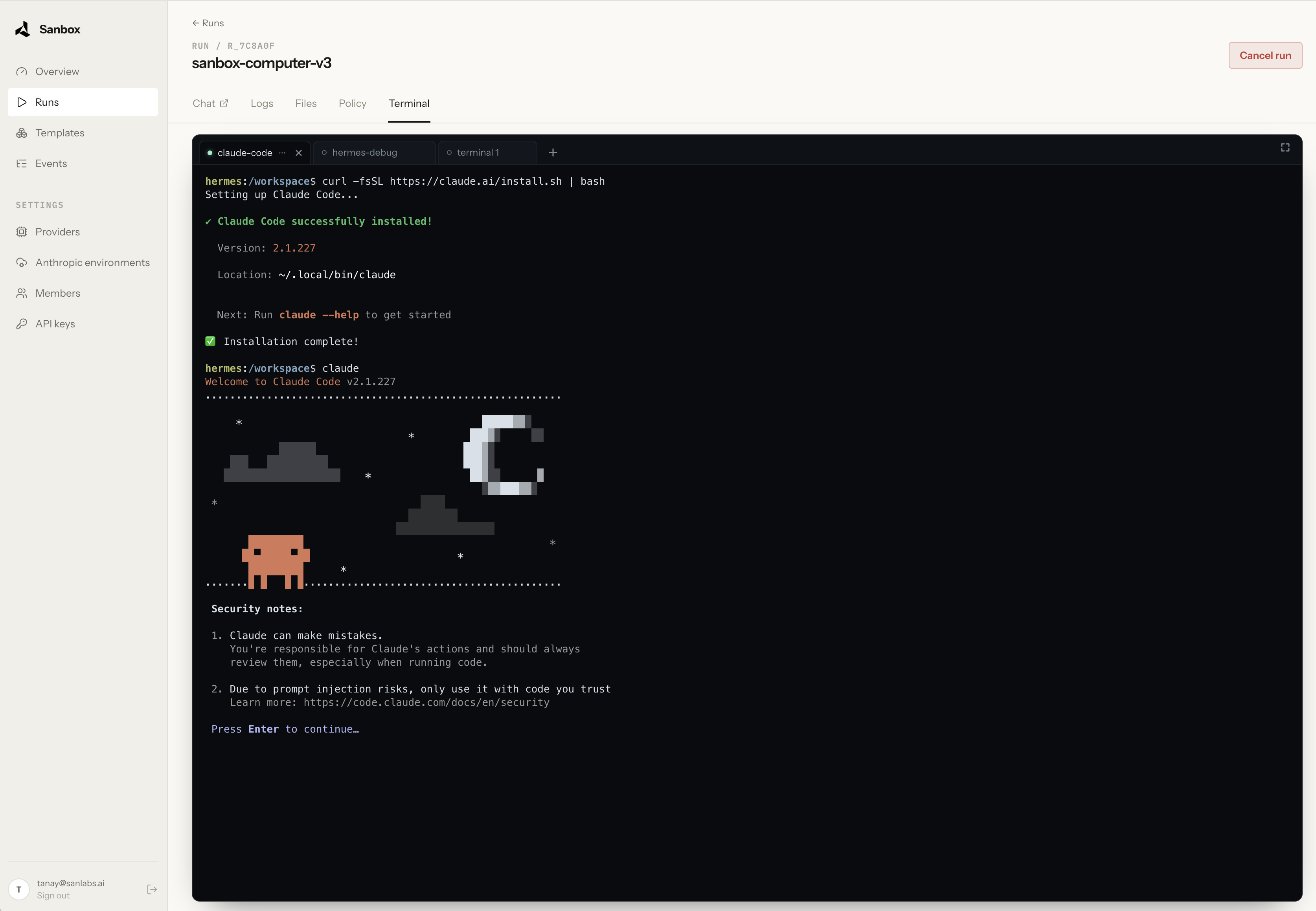
Persistence was the part we cared about most. Closing the browser tab should not affect the terminal session, and reopening that session in a new tab or on another machine should work seamlessly. That meant the stack needed three pieces:
- Session backend — keeps the shell and its processes alive while nothing is attached.
- Terminal emulator — parses the output stream and maintains the screen state.
- Browser client — renders that state in the browser and captures human input.
The other challenge was establishing secure communication with the terminal. A browser has to reach a terminal running inside the sandbox, and we did not want to expose a terminal port to the internet.
After some research, we settled on the following components.
Zellij as the session backend
Zellij is a terminal multiplexer with persistent sessions. Its CLI can attach to an existing session or create one when it does not exist. That lifecycle is the part Sanbox relies on; we do not expose Zellij's full workspace interface.
Each Sanbox terminal maps to its own single-pane Zellij session. The tab bar, status bar, and pane frames are disabled.
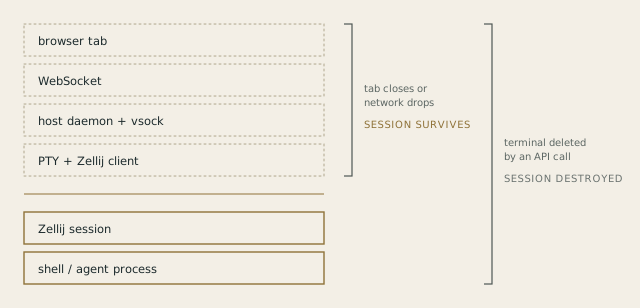
On disconnect, the Zellij client detaches while the session and its processes continue to run. Reopening the terminal attaches to the same session, including its scrollback. Explicitly closing a terminal is different: it removes the Zellij session and stops the processes running inside.
We kept the Zellij session names internal. Zellij receives an opaque, system-generated name, while the control plane gives the terminal a user-facing label. Keeping the stable session ID separate from the editable label lets Sanbox manage terminal discovery and lifecycle without depending on Zellij's display state.
Zellij is not the security boundary or the transport. The Sanbox control plane handles authorization, one-time connection tickets, terminal inventory, lifecycle controls, and the private path into the microVM. Zellij's only job is to keep the session alive when no client is attached.
wterm in the browser
Because the session lives inside the sandbox, the browser does not need to preserve process state. Its job is to render the current terminal state and forward input.
We use Vercel's wterm for the browser terminal. It is still a young project, but it has been a practical base for the current implementation.
Sanbox uses @wterm/dom for rendering and input. It renders terminal cells as DOM elements, which gives us browser-native text selection, copy and paste, find, and a better foundation for accessibility than a custom canvas renderer.
We still needed two compatibility adapters: one translates mouse-wheel events, and another answers terminal capability queries from Zellij. The rest of the browser integration is mostly PTY output in one direction and input, resize, and close messages in the other.
Ghostty as the emulator
Sanbox uses @wterm/ghostty, which packages Ghostty's terminal-emulation core for WebAssembly. libghostty-vt parses escape sequences and maintains terminal state: cursor position, colors, alternate screens, Unicode behavior, and scrollback.
High-level flow of a command from the browser to the shell:
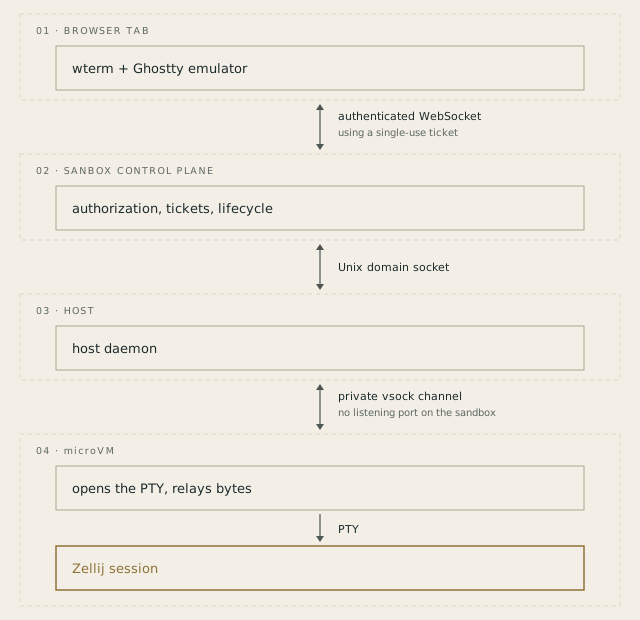
The division of responsibilities looks like this:
- Ghostty parses terminal output and maintains the terminal state.
- wterm renders that state in the browser and handles input.
- Zellij keeps the shell and agent session alive inside the sandbox.
- Sanbox provides authorization, private transport, and lifecycle controls.
Getting a connection into the Sanbox Computer
The Sanbox runtime does not expose a public terminal port accessible from the internet. The browser connects to the Sanbox control plane, which talks to the host daemon over a Unix socket, and the host reaches the guest through a private vsock channel to the microVM.
Browser WebSocket APIs do not let the application set an Authorization header during the upgrade. Sanbox first uses an authenticated HTTP request to issue a short-lived, single-use ticket, then puts that ticket in the WebSocket URL. The control plane stores only its SHA-256 digest in memory. The ticket expires after 60 seconds and is consumed on first use, limiting the value of a URL captured by a log or intermediary.
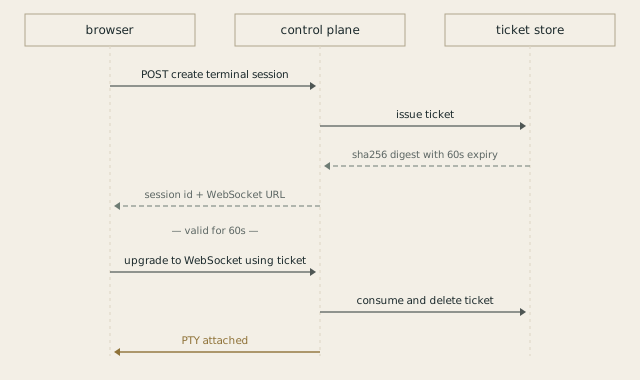
The ticket authorizes only the handshake. Once connected, the WebSocket can remain open for a long-running command. If it drops, the command continues inside Zellij and the browser reconnects with a new ticket.
This is what makes the terminal feel local while remaining browser-based. You can start an agent, inspect its work, close the tab, and return later without losing the session. The browser is only the client. The Computer remains the source of truth.